Call to Action QR Code: 7 Examples You Can Use
Seven QR call-to-action examples with copy-ready headlines, support lines, and destination checks for menus, reviews, events, booking, and packaging.
A QR call to action is the short instruction printed beside a code. It tells someone why to scan and what should happen next. “Scan to view the menu” is more specific than “Scan me” because it names the destination’s purpose.
Choose the action first, then prepare the page and the code. A strong line cannot make up for a slow page, a login wall, or a destination that does not deliver what the sign promises.
Seven QR call-to-action examples
These are sample messages, not measured campaign results. Adapt the promise to what your business actually offers.
| Message | Where to use it | Where the QR should go |
|---|---|---|
| Scan for 20% off your next order | An offer card or package insert | A mobile offer page with eligibility, terms, and a clear way to redeem. Only advertise a discount you actually offer. |
| Scan to order | A counter sign or table stand | The ordering page for the correct location, ready for someone to choose items. |
| Scan for today’s specials | A restaurant menu stand | A current menu or specials page. Keep it updated; use the PDF QR tool if the menu is a document. |
| Scan to book an appointment | A salon card or reception sign | The relevant booking page, with a clear service and location. |
| Scan for the setup guide | Product packaging | The guide for that product model, accessible without the owner’s account. |
| Scan to register for the event | A flyer or event poster | The attendee registration form. The Google Forms QR tool helps prepare a responder-link QR. |
| Scan to leave a review | A receipt or counter card | The correct business’s review form. Use the Google review QR tool for a neutral invitation. |
Keep review requests open and neutral. Do not turn “leave a review” into “leave five stars,” or tie the discount example to a positive review. They are different actions with different purposes.
Copy-ready QR call-to-action templates
Each template has a main line, an optional support line, and a destination check. Replace every bracketed field before printing. Remove a support line if you cannot deliver its promise.
1. Offer card: make the conditions visible
Scan for [offer]
Use by [date]. [Key eligibility condition].
Example: “Scan for 20% off your next online order” / “Use by October 31. New customers only.” This is sample copy, not a current Scanely promotion. The linked page needs the same offer, full terms, and a working redemption step. Avoid “Unlock your reward” when the visitor still has to discover what the reward is.
2. Restaurant ordering: name the next action
Scan to order from [location]
Choose your items and [pickup or table instructions].
Use this only when the destination accepts orders. If it just shows dishes and prices, use the menu template instead. Test which location opens and whether the ordering service is available when the sign is displayed.
3. Menu stand: separate browsing from ordering
Scan to view our menu
[Restaurant name] · [Breakfast, lunch, or dinner].
Start with the menu table-stand template. Link to a readable mobile menu or a public PDF. “Scan to view our menu” does not imply that a guest can order or pay on the same page.
4. Booking card: name the service
Scan to book [service]
Choose a time at [location].
“Scan to book a haircut” is more specific than “Find out more.” Open the correct service and location, and check that available appointments appear. If scanning starts an enquiry rather than confirming a booking, say “Scan to request an appointment.”
5. Product packaging: identify the right guide
Scan for the [model] setup guide
[Language or format, if useful].
Send the reader straight to that model’s instructions. Do not use a homepage where they must search again. A human-readable model number beside the QR also helps someone who needs to find the guide manually.
6. Event poster: describe registration honestly
Scan to register for [event]
[Date] · [Place]. [Price or eligibility, when relevant].
Use a registration-form QR with the responder link. Complete a test submission while signed out. If the form only requests a place and confirmation follows later, use “Scan to request a place” and explain that process on the form.
7. Review card: invite every customer's experience
Scan to leave a review
Tell us about your experience at [business].
Use the review-card template and confirm the business listing. Keep the invitation neutral: no requested star rating, rewards, or screening customers before showing the public review link. Google's contribution policy prohibits incentivized reviews and selectively soliciting positive reviews.
Download all seven copy templates as a text file. For a private feedback form, start with the feedback sign and say “Scan to share feedback,” so visitors do not expect a public review.
Make the next step predictable
A useful message combines an action with a concrete outcome: view the menu, book a table, download the guide, or submit feedback. Add context when it prevents uncertainty - for example, the event name or product model outside the code.
Put the instruction close enough that it clearly belongs to the QR, while keeping it outside the empty border. A short readable line is usually easier to place than a paragraph of instructions. Use the QR size calculator to plan for the expected viewing distance.
If you need a layout now, start with a US Letter sign, menu stand, or business card template. For a custom design, see the Canva print checklist or Adobe QR guide.
Match the page to the promise
Imagine a flyer that says “Scan to book a haircut.” Sending it to the salon homepage adds another task: finding the right service, location, and booking link. A direct booking page gives the visitor a clearer next step.
Before printing, open the destination on a phone while signed out. Check that the advertised action is available, the content fits the screen, and any required terms are clear. For a form, submit a test response. For a PDF, check that your intended readers can open it.
A QR scan is only one step. A completed booking, submitted form, or redeemed offer happens at the destination. Keep those measures separate.
Test printed wording and destination pages differently
To compare words on paper, print the different words. A dynamic QR cannot change an instruction already printed next to it. Make two layout variants with separate codes or campaign links so you can identify which version a visit came from.
Keep placement, exposure, timing, and offer as comparable as practical. A sign at the checkout and a flyer on an empty side table do not give the messages the same opportunity to be scanned. If the audience is small, describe the result as directional instead of declaring a proven winner.
To compare destination pages, keep the printed message accurate for both. A/B Testing splits scans between two offer destinations behind the same printed QR. Set an equal traffic split and compare scan counts per variant. It is available on Pro, Business and Lifetime plans; see feature availability. This tests the destinations after a scan; the printed wording stays the same.
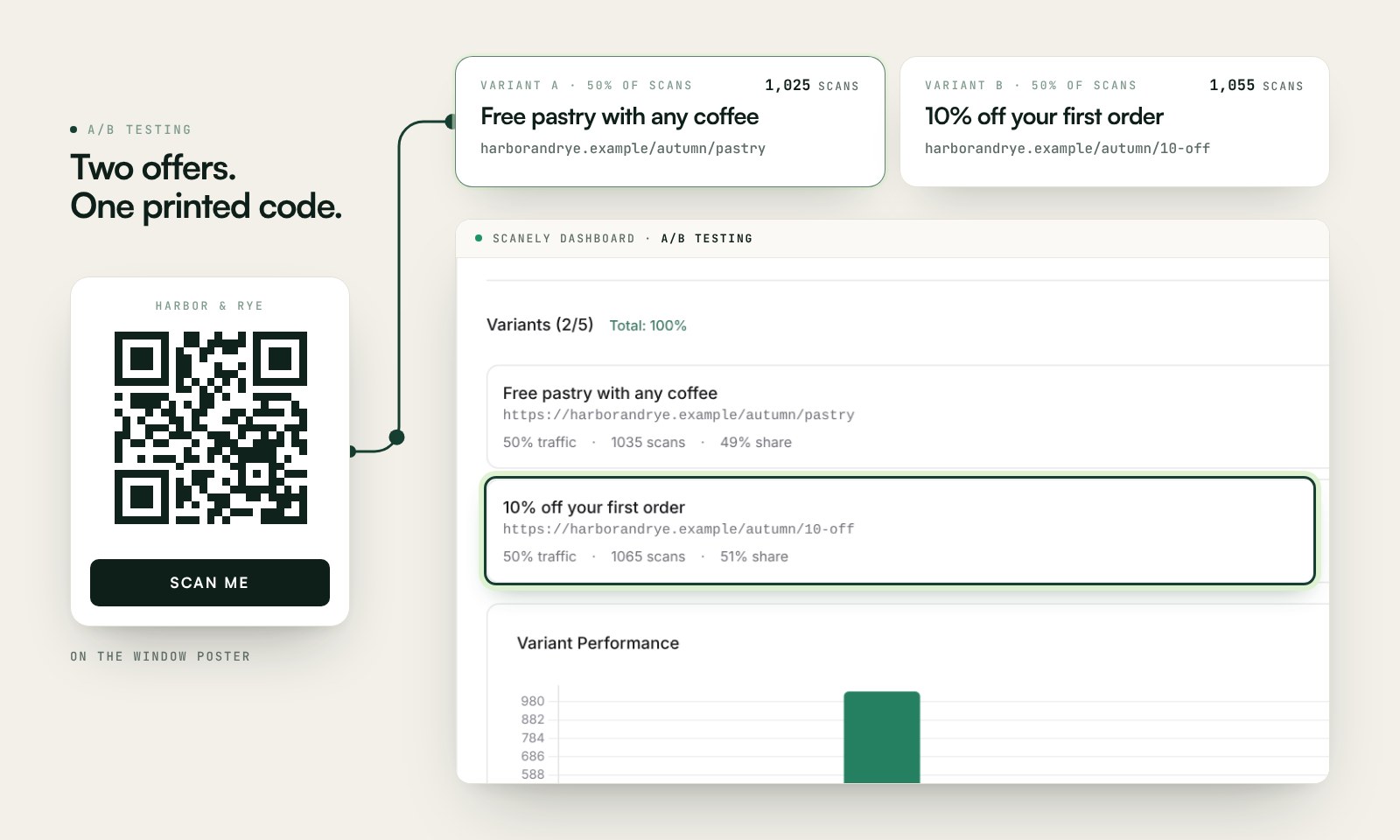
Changing the destination from a menu to a signup form would break a “Scan for today’s specials” promise even if the redirect works perfectly. Keep the visitor’s expectation consistent throughout a test.
Measure the action, not only the scans
Record a few useful quantities for each placement:
- How many pieces were distributed, or how long the sign was displayed.
- QR scans if using a managed tracking code.
- Landing-page visits and completed actions from the destination’s analytics.
- Costs and revenue when they can actually be attributed to the campaign.
Scans are not necessarily unique people, and a scan is not an order or review. Do not calculate a response rate without defining its denominator. For example, completed registrations divided by recorded landing-page visits describes a different step from registrations divided by distributed flyers.
Use the UTM builder when your destination analytics supports campaign parameters. The flyer ROI calculator can help estimate economics from your own inputs; an estimate is not an observed result.
A pre-print checklist
- Read the instruction and name the action it promises.
- Open the link as a visitor and complete that action.
- Download the final QR, preserving its square shape and the four-module clear border specified by DENSO WAVE. A module is one small square in the pattern; keep the caption outside that border.
- Read the saved image, then scan the full printed layout with a phone.
- Save the placement, link, and QR owner together so someone can maintain the campaign.
If you need an editable destination, create the dynamic code before printing. A free static download cannot later acquire a different encoded URL. Our QR expiry guide explains how to keep destinations available and what can be repaired if a print stops working.
Frequently asked questions
What is a good QR call to action?
A short instruction that names the actual outcome: “Scan to view the menu,” “Scan to book,” or “Scan for the setup guide.” Choose wording that matches the destination and is readable at the intended distance.
Can I A/B test QR wording without reprinting?
You need different printed versions to compare words on paper. Dynamic routing can compare destination pages without changing the QR, but it cannot alter the physical caption around it.
Do I need a dynamic QR for every call to action?
No. A static code can suit a stable link, including a page you maintain on your own domain. A managed dynamic code is useful when you want destination editing and QR scan analytics. Choose based on the campaign’s needs before printing.