Restaurants QR Codes: One Per Table Beats One Per Restaurant
One QR code per table beats a single shared menu - you see which seats engage most and can swap lunch/dinner menus without reprinting a single table tent.
TL;DR
Restaurants QR codes work best when they are dynamic, not static PDF links left over from the pandemic. Use separate codes per placement - table, window, takeout bag, bar - so each one is trackable and updateable without reprinting. Treat every printed code like a live revenue channel, not a one-time print job.
Restaurants QR codes are scannable codes placed on tables, windows, takeout packaging, and bar surfaces that link guests directly to digital menus, ordering pages, specials, or feedback forms - turning each printed placement into a measurable touchpoint for the restaurant. A restaurant owner prints a QR code, links it to a PDF menu, puts it on every table, and moves on. Months later, the menu has changed, prices have shifted, a few dishes are gone, and nobody knows whether guests are scanning or ordering from it.
That's where most restaurants QR codes get stuck. The code exists, but it isn't managed like a live sales channel.
The better approach is to treat every printed code like a measurable touchpoint. A table tent, window cling, takeout bag, and bar mat can each send guests to different destinations, reveal different behavior, and support different goals.
Moving Beyond the Pandemic QR Code
A lot of restaurant teams adopted QR menus because they had to. The code replaced laminated menus fast, solved a contact issue, and kept service moving. What many operators have now is the leftover version of that decision: one generic code, one static destination, and no visibility into whether it's helping.
That matters because QR menus are mainstream, but they aren't universal. In mid-2023, 45% of U.S. adults said they had used a QR code to view a restaurant menu in the past 12 months, while the same 45% said they had not, according to Statista's U.S. restaurant QR menu usage data. That's a clear signal that restaurants can't assume every guest will scan just because a code is on the table.
A static PDF also creates operational drag. If a price changes, a dish gets 86'd, or brunch switches to lunch, the printed code still points guests to the old version unless someone manually replaces the file and checks every link. Our guide to renaming a link explains the difference between changing visible text and changing a destination - and why only the second matters for printed QR codes.
Operational reality: a QR code that can't adapt becomes stale faster than most restaurant owners expect.
The smarter model is simple. Keep the printed code stable, but make the destination flexible and measurable. That turns the code from a placeholder into a working part of service, merchandising, and local marketing.
Restaurants that want a category-specific setup can review restaurant QR code use cases. The key idea isn't the tool itself. It's that the code should be updateable, trackable, and tied to a real business decision.
The takeaway: restaurants QR codes work best when they're managed like a live revenue channel, not a one-time print job.
Why Dynamic QR Codes Are Essential for Restaurants
A static QR code points to one fixed destination. Once it's printed, that destination is locked. A dynamic QR code sends the guest through an editable link, so the final destination can change without replacing the printed code.
That difference sounds technical, but it changes day-to-day operations. A static code is tolerable for a page that never changes. A restaurant menu is not that kind of page.
Static vs dynamic in restaurant service
For menus that change more than once a quarter, a dynamic QR code is the most operationally sound choice because it supports instant updates to a linked HTML menu instead of forcing a reprint cycle, as explained in QRLynx's guide to QR codes on menus.

Here's the practical comparison.
| Feature | Static QR Code | Dynamic QR Code |
|---|---|---|
| Destination editing | Fixed after printing | Editable after printing |
| Menu updates | Requires replacing the linked asset | Update the destination without reprinting |
| Daily specials | Clumsy to manage | Easy to swap in and remove |
| Sold-out items | Often lag behind reality | Faster to reflect current availability |
| Analytics | Typically limited or absent | Built for tracking scan behavior |
| A/B testing | Hard to run | Straightforward with the right platform |
| Multi-location control | Manual and fragmented | Easier to organize centrally |
Where static codes break down
A static PDF menu seems convenient until the restaurant starts operating like a restaurant. Suppliers change. Pricing changes. A seasonal cocktail list appears for six weeks. Happy hour needs one destination, dinner another.
With Scheduled Redirect, one printed URL code opens breakfast, lunch and dinner menus during their time windows, then the main menu outside those windows. Choose your restaurant’s timezone and set each window in the schedule editor. Schedules require Pro, Business or a Lifetime plan and are not available on Page codes.
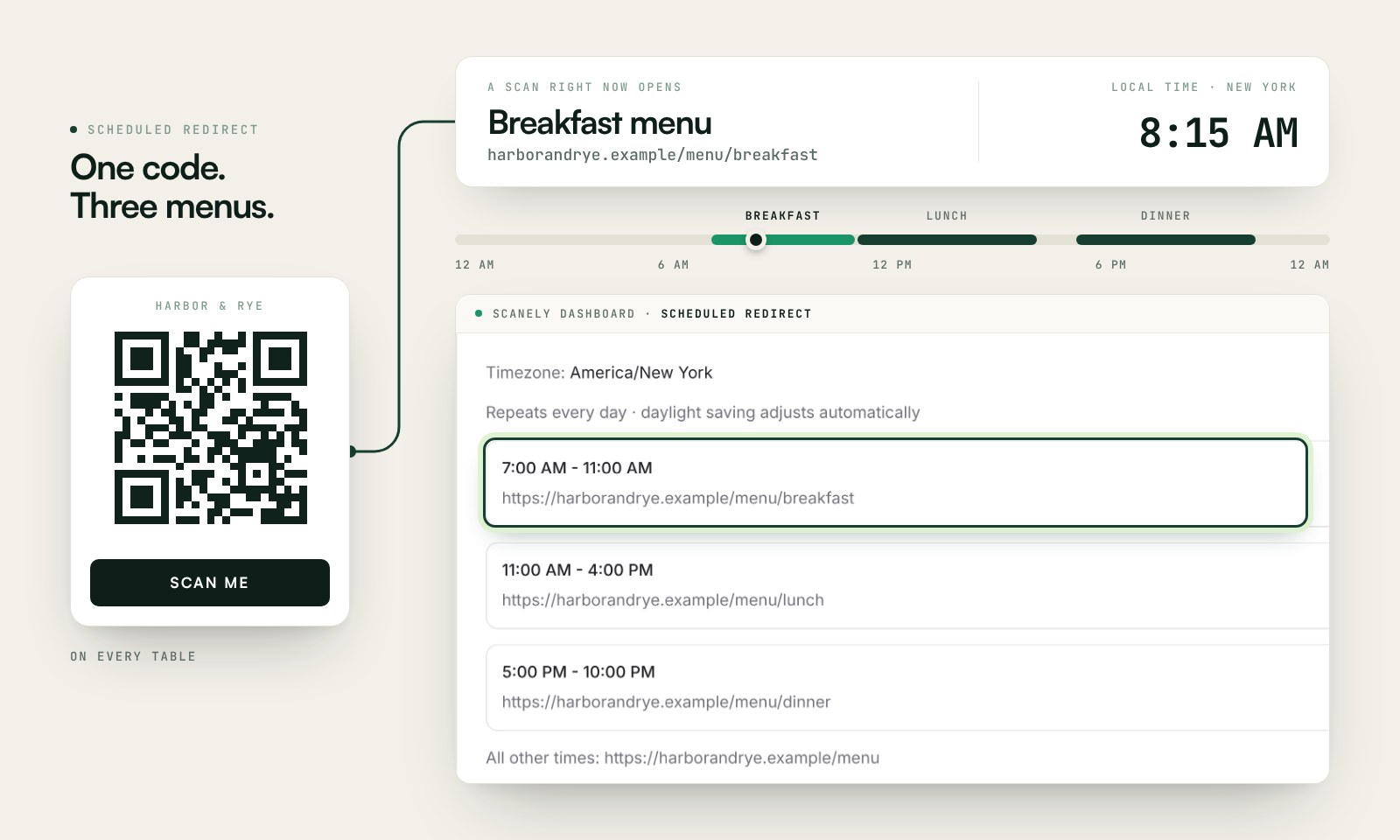
Use one printed code per table, then control the destination behind it. That's the simplest way to reduce reprint waste and keep content accurate.
For teams evaluating platforms, this explanation of dynamic QR codes lays out the mechanics in plain language. Tools in this category usually matter less for code generation than for edit control, redirect logic, and reporting.
What actually works
The strongest setup for restaurants QR codes is usually this:
- Use a dynamic URL QR code: Don't hard-code a PDF unless there's a specific reason to offer a downloadable menu.
- Point it to a mobile HTML menu: That's easier to update and easier for guests to use.
- Separate print from destination: The table card stays the same while the menu changes behind it.
- Keep one code per placement: Table, window, takeout, and bar should usually have distinct trackable codes if the business wants clean data later.
The takeaway: dynamic QR codes aren't a premium extra for restaurants, they're the basic operating model that keeps menu links accurate and usable.
Build an editable menu before choosing placements
If you need a menu destination, Scanely Pages can host one with dishes, descriptions, prices, photos and a Sold out setting. Choose a restaurant template, replace the sample details, publish it, and keep the same page link and QR when you update the menu.
Follow how to create a QR code menu for the full setup and print test. Once the menu is ready, decide whether one shared code is sufficient or separate placement codes will help answer a specific question. An extra dynamic code uses another account slot.
Designing and Generating Codes Guests Will Scan
A QR code can be technically valid and still underperform. Many restaurants print tiny black-and-white squares with no label, weak contrast, and no reason for a guest to care. Then they assume the problem is low adoption.
Design changes that. Supercode's restaurant QR guide reports that branded and custom-designed QR codes can achieve 30% to 45% higher scan rates than plain codes. That doesn't mean every decorative treatment is safe. It means thoughtful customization can improve response when scannability stays intact. For visual inspiration on how top brands balance design and scannability, browse our coolest QR codes roundup.

Design choices that help
The first job of the code is to get scanned. The second job is to look like it belongs in the restaurant.
A solid production checklist looks like this:
- Add a clear call to action: "Scan to see the menu" works better than leaving the code unexplained.
- Use brand color carefully: Keep strong contrast between the code and background.
- Include a logo only if testing confirms scannability: Brand matters, but scan reliability matters more.
- Match the placement: A bar-top code can be more compact than a front-window code.
- Avoid reflective finishes: Glossy coatings and shiny laminates create glare.
Practical rule: if the code needs a staff explanation every time, the design or label probably isn't doing enough work.
File format matters more than most owners think
Restaurants often generate a QR code online, download a small PNG, and send it straight to the printer. That works for some digital uses, but print quality suffers when the file gets stretched.
For production, the safer workflow is:
- Generate the final code after the destination structure is set using a QR code generator.
- Export SVG for print materials that may be resized.
- Use PNG for small digital placements where fixed dimensions are fine.
- Test the printed output on actual stock, not only on a screen. Use a QR code scanner to verify the code reads correctly before a full print run.
Keep the destination aligned with the print promise
If the sign says "Scan for today's menu and specials," the landing page should open directly to that content. Don't send guests to a homepage and make them hunt for the menu.
That mismatch is common with restaurants QR codes. The printed message is specific, but the digital destination is generic. Each extra tap creates friction, and friction lowers scans, browsing, and orders.
The takeaway: the best QR code design balances branding, clarity, and print reliability so guests can scan instantly and know exactly what they'll get.
Strategic Placement and a Seamless User Experience
Good restaurants QR codes fail all the time because of bad placement. The code is too small, hidden under a condiment caddy, printed on a reflective stand, or positioned where low lighting kills the scan.
Physical setup is part of the guest experience. Supercode recommends a minimum print size of 2.5 cm x 2.5 cm for table stands, which is a useful baseline for close-range use in dining rooms. Use a QR size calculator to find the right dimensions for each placement distance.
Where codes usually earn their keep
A casual lunch spot may use table tents for dine-in ordering, a front door decal for passersby, and a takeout-bag sticker for repeat visits. Each placement serves a different moment.
The strongest placements are usually the ones with obvious intent:
- At the table: menu access, ordering, payment, or specials
- At the entrance: hours, waitlist, lunch menu, or promotions
- On takeout packaging: reorder page, feedback, or loyalty path - similar to how retail brands use packaging codes for post-purchase engagement
- At the bar: drink menu and limited-time offers
For restaurants that want a direct customer messaging channel - catering requests, allergy questions, large-party bookings - it's worth pairing the menu code with a separate WhatsApp code. Our guide on how to create a WhatsApp QR code covers prefilled messages that route those conversations to the right person.
For restaurants that also display QR code posters in the front window or near the entrance, our poster playbook covers design and sizing for those larger-format placements.
Mixed-mode service beats QR-only rigidity
Consumer comfort still varies widely. A Restaurant Dive report on QR comfort in restaurants cites a William Blair survey showing 47% of consumers were uncomfortable using QR codes in restaurants. The same report notes that discomfort rises with age.
That doesn't argue against QR. It argues against forcing every guest into the same flow.
Keep printed backup menus available, and train staff to offer help without making guests ask twice.
A host can point out the code and the fallback option in the same sentence. A server can say the specials are on the digital menu but can also bring a printed menu immediately. That removes pressure, especially for older diners or anyone dealing with weak connectivity, dead battery, or phone fatigue.
Simple placement checks before launch
- Check lighting: Scan under lunch and dinner conditions.
- Check glare: Tilted acrylic and glossy laminate often cause trouble.
- Check reach: Guests shouldn't need to stand up or move tableware to scan.
- Check the first page load: Fast, mobile-friendly destinations matter as much as the printed code.
The takeaway: placement isn't a print decision, it's a service decision that determines whether guests can use the code comfortably.
From Scans to Insights with QR Code Analytics
The value of restaurants QR codes starts after the scan. Without analytics, a restaurant only knows that a code exists. With analytics, the operator can start answering practical questions about demand, timing, and placement.
That matters because the revenue upside isn't theoretical. Sunday's article on how QR ordering increases average spend cites a restaurant case study with a 15% increase in average check size within three months after adopting QR code ordering. The lesson for operators isn't that every restaurant will get the same result. It's that tracking behavior is the first step toward improving it.

The metrics that matter
A restaurant owner doesn't need a bloated dashboard. A few metrics are enough if they lead to action.
- Total scans: Shows whether a placement gets attention at all.
- Unique visitors: Helps separate repeated activity from broader reach.
- Time-of-day scan patterns: Useful for lunch, happy hour, and late-night decisions.
- Location data by city or country: Helpful for tourist-heavy venues and regional campaigns.
- Device and OS breakdowns: Can expose mobile rendering issues on certain devices. If Android scans look low, our guide on how to scan QR codes on Android explains the methods guests actually use.
Turning scan data into operating decisions
A window QR code that gets strong midday traffic should probably point to the lunch menu, not the full dinner experience. A takeout-bag code that gets repeat scans could be used for reorder prompts or review requests. A patio code that underperforms might not have a marketing problem at all. It might have a glare problem.
Campaign structure matters in this context. Separate codes by placement and purpose so comparisons mean something. "Table 12 menu" and "takeout bag reorder" shouldn't live under one unlabeled bucket.
For teams that want a step-by-step walkthrough, our guide to tracking QR code scans covers how to monitor scans, organize campaigns, compare placements, and review device and geography data. Setting up a trackable QR code completes the analytics picture by recording scan timing, location, and device data.
Scan data is most useful when each printed code has one job. Mixed-purpose codes produce muddy reporting and weak decisions.
What not to do
Restaurants often make two mistakes. First, they use one QR code everywhere and lose placement-level visibility. Second, they collect scan data but never connect it to a change in menu layout, staffing, promo timing, or offer strategy.
Analytics only matter if somebody acts on them. If lunch scans spike before noon, feature lunch sooner. If few guests scan the dessert code, change the table prompt or move the placement. For restaurants running broader print campaigns - flyers, window signs, or takeout inserts - our QR code ad guide covers how to track offline ROI across every placement. Restaurants that also send weekly specials by email can extend the same tracking to the inbox with a QR code in email.
The takeaway: analytics turn QR codes from passive links into an operating signal that can shape menus, offers, and service timing.
A/B Testing Your Way to Higher Revenue
Most restaurant menu decisions still come down to preference. Someone thinks cocktails should go first. Someone else wants appetizers higher. The chef wants more photography. The owner wants fewer clicks.
A/B testing replaces those debates with observed behavior. One dynamic code can split guests between two versions of a menu or landing page, then the restaurant can compare which version drives better engagement or higher-value actions.

Good tests for restaurants
The best tests are narrow. Don't redesign everything at once.
Useful starting points include:
- Menu order: put high-margin items higher on one version
- Photography: show a featured cocktail image on one version and text only on the other
- CTA wording: compare "Scan for Menu" against "Scan for Today's Menu & Specials"
- Landing path: send one group to the full menu and another to a lunch-specific page
Keep the test clean
A valid test needs one meaningful change at a time. If the code sends guests to two totally different layouts with different offers, different copy, and different images, the result won't explain what worked.
A practical rollout checklist helps:
- Use a dynamic code, not a static one.
- Assign one code per placement or campaign.
- Send guests to a mobile page, not a hard-to-use PDF when avoidable.
- Add a visible CTA on the printed material.
- Test the code in real lighting before launch.
- Review scan data by placement and time.
- Run one A/B test on one variable.
- Keep the winner, then test the next variable.
Small tests beat dramatic redesigns because they produce answers a restaurant can actually trust.
Restaurants don't need enterprise tooling to start thinking this way. They need a clean setup, distinct codes, and a habit of changing one thing at a time. A venue that also plays curated music could even add a Spotify QR code on tables to extend the dining experience, using the same dynamic-code approach to track which playlists guests engage with.
The takeaway: A/B testing turns restaurants QR codes into an ongoing optimization system instead of a fixed menu access point.
If a restaurant wants to move from static menu links to measurable QR campaigns, the first step is choosing a platform that supports dynamic codes, destination updates after printing, scan analytics, campaign organization, and A/B testing - all without changing the physical materials already in service. For event catering or pop-up situations, the same setup lets operators swap destinations between services without reprinting signage. The same dynamic codes work for private dining and tasting nights - see our guide to QR code attendance for how restaurants use scans at the door to track guest arrival, seating flow, and follow-up email opt-ins from a single event.
Scanely helps restaurants turn printed QR codes into trackable campaigns. Create dynamic codes, update destinations after printing, and review scan activity by placement and time - all from one dashboard. Use our free QR code generator to create a restaurant QR code that works with any phone camera.